Upgrade your Reah plan
Last updated 2 months ago
Summary
Upgrading your Reah plan gives your team immediate access to higher-tier features. Billing adjusts on a prorated basis from the day you upgrade.
How to upgrade
- Click the Upgrade button in the bottom-left corner of the homepage
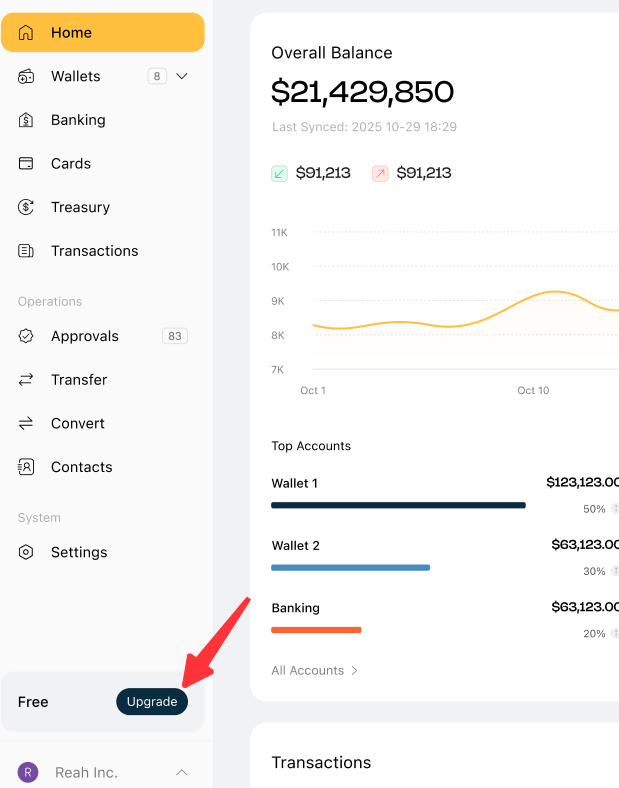
- Select the plan you want to upgrade to (currently supports upgrading to the Pro Plan), then click Upgrade.
- For Enterprise plan upgrades, please contact us
- Complete the payment as instructed to finish the upgrade
What happens to your billing
- You are charged a prorated amount for the remainder of the current billing period at the new plan rate.
- Starting your next billing cycle, you are charged the full rate of the new plan.
- Your billing date does not change.
What changes after upgrading
- New features included in your upgraded plan are available immediately.
- Your team size limit, feature access, and any usage caps update to the new tier right away.
What happens if your subscription payment fails
If your subscription payment isn’t completed successfully, your workspace moves through a downgrade flow:
- Active
Your subscription is active and all features included in your current plan are available.
- Grace period (3 days)
You enter a 3-day grace period immediately after a failed payment. During this period:
- Your current plan remains fully active
- No features are restricted
- You can update your payment method and resume your subscription without interruption
- Restricted
If payment is still not completed after the grace period, your workspace enters a restricted state. During this stage, some actions may be limited, including:
- Creating new wallets
- Inviting new members
- Accessing certain plan-specific features
Existing wallets, balances, and core operations remain accessible.
- Downgraded
If payment is still unresolved, your workspace is downgraded to the Free Plan. At this stage:
- Your seat limit resets to the Free Plan limit
- Users exceeding the allowed seat count will temporarily lose access until the seat count is reduced or the subscription is restored
- Paid plan features are no longer available
You can restore full access at any time by reactivating your subscription.
Downgrading
To move to a lower-tier plan, contact Reah support through the help icon in your dashboard. Downgrades take effect at the start of the next billing cycle.
What to do next
Was this helpful?
Still need help? Ask the team