Set transaction approval rules
Last updated 5 months ago
Summary
Money Movement Approval Flow controls how transactions are reviewed before funds leave your workspace.
Instead of writing isolated rules for every action, Reah routes each transaction through approval policies based on transaction conditions, usually the transaction amount.
This helps you:
- Auto-approve low-risk transactions
- Add extra review for higher-value transfers
- Apply consistent approval controls across roles
- Prevent sensitive transactions from executing without authorization
How Money Movement approval works
Every money movement request follows the same three stages:
- Initiate: A user submits a transaction request
- Approve: The request is routed to the required approval roles
- Execute: The transaction executes after approval requirements are met
Approval rules are evaluated from top to bottom. The first matching rule determines the approval path.
Open Money Movement Approval Flow
- Go to Settings.
- Select Approval Flow.
- Choose Money Movement.
This opens the Money Movement approval canvas.
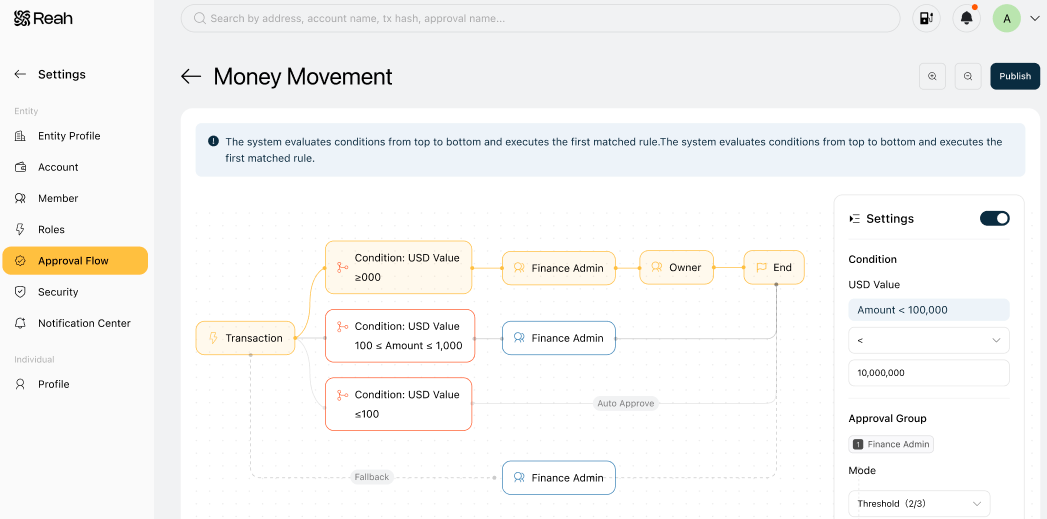
How approval rules are structured
Money Movement uses condition-based approval rules.
Each rule defines:
- Condition: When the rule applies
- Rule status: Whether the rule is active
- Approval roles: Which roles participate in approval
- Approval mode: How each role completes approval
- Timeout: How long the request can remain pending
Rules are evaluated in order. The first rule that matches the transaction condition determines how approval proceeds.
Configure an approval rule
- Click a rule node in the approval canvas.
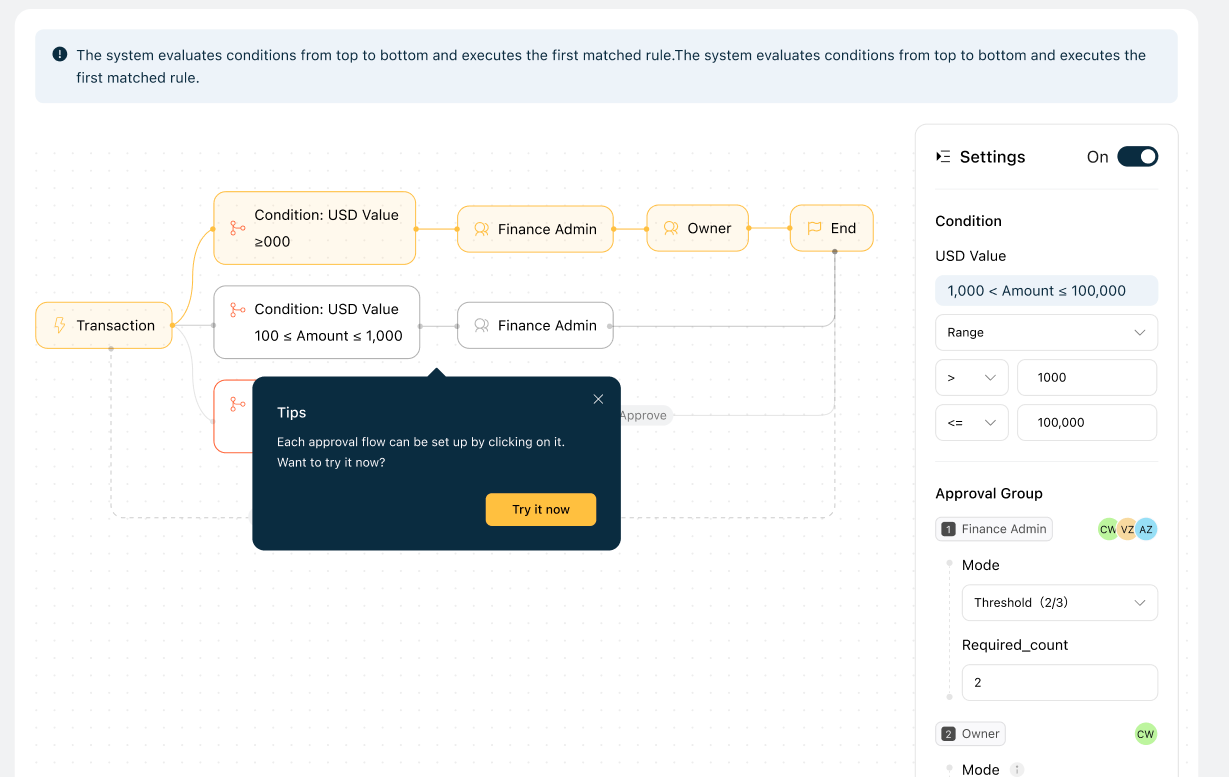
- In the right-side Settings panel, edit the rule.
- Click Publish to apply the updated approval flow.
Changes only take effect after publishing.
Approval rule settings
Condition
Conditions determine when a rule applies.
Money Movement supports editable amount-based conditions.
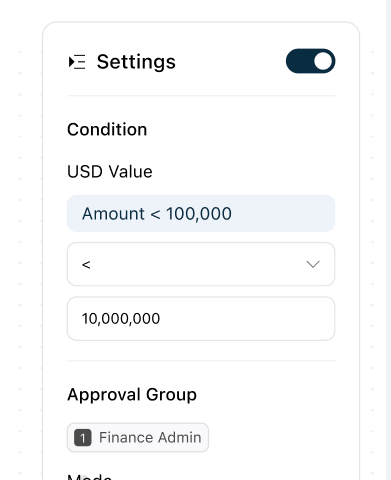
Examples:
- Amount ≤ 100
- Amount > 100 and < 100,000
- Amount ≥ 100,000
Conditions are checked from top to bottom. The first matching condition is applied.
Approval roles
Approval roles define which roles participate in approval.
Each approval node is tied to a role, such as:
- Finance Admin
- Admin
- Owner
The sequence between roles is predefined by the workflow.
You can configure how each role completes approval by editing its approval mode.
Examples:
- Finance Admin approval may require 1 of 2 approvers.
- Owner approval may require all owners.
Approval mode
Approval mode determines how a role completes approval.
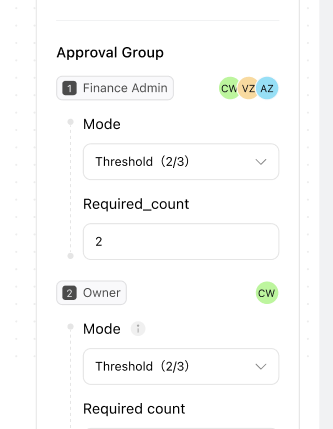
Supported options:
- Any one: Any eligible person in the role can approve
- Threshold: A minimum number of approvals is required
- Require all: Every eligible approver must approve
Owner approval mode can only be modified by owners.
Timeout
Timeout determines how long an approval request remains active.
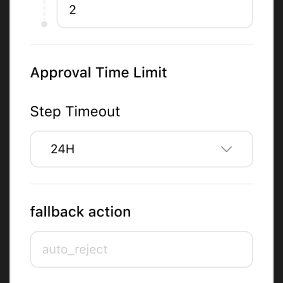
Maximum timeout is 30 days.
If the timeout expires, the request is automatically rejected.
Disable rule
Individual rules can be disabled.
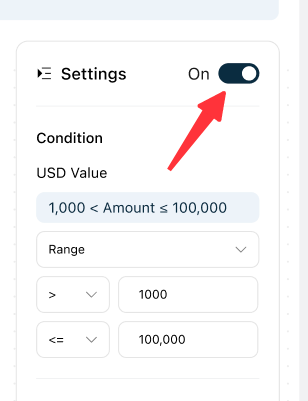
When disabled:
- The rule is skipped during evaluation
- The condition no longer applies
Approval behavior by initiator role
Approval behavior can vary depending on who initiates the transaction.
Owner-initiated transactions
- Only require Owner-level approval
- Do not route through lower-level approval roles
Admin-initiated transactions
Admin-initiated transactions do not automatically satisfy Admin approval requirements.
Example:
- An Admin submits a transaction.
- The matched rule requires Admin approval.
- The initiator’s action does not count as approval.
- Another eligible Admin must review and approve.
If there are not enough eligible Admin approvers, approval escalates to an Owner.
Member-initiated transactions
- Follow the configured approval rule
- Route to the required approval roles based on the matched condition
- May require Admin and or Owner approval depending on the rule
Default Money Movement approval logic
By default, Money Movement includes three approval tiers.
Tier 1: Low-value transactions
- Amount ≤ 100
- Automatically approved
Tier 2: Mid-value transactions
- Amount > 100 and < 100,000
- Requires Finance Admin approval
Tier 3: High-value transactions
- Amount ≥ 100,000
- Requires Finance Admin approval followed by Owner approval
Supported initiator roles:
- Member
- Admin
- Owner
You can modify amount thresholds and approval modes to match your organization.
Example approval flow
Examples:
- $50 transfer: Auto-approved
- $500 transfer: Requires Finance Admin approval
- $10,000 transfer: Requires Finance Admin approval and Owner approval
This structure helps:
- Keep low-risk transactions fast
- Add oversight for larger transfers
- Reduce approval bottlenecks
Best practices
- Use multiple amount tiers to separate low-, medium-, and high-risk transactions.
- Auto-approve low-value transfers when appropriate.
- Require multi-step approval for large transactions.
- Configure timeouts to avoid stalled approvals.
- Review approval logic as your organization grows.
- Test approval rules before rolling them out broadly.
What to do next
Was this helpful?
Still need help? Ask the team